> ## Documentation Index
> Fetch the complete documentation index at: https://docs.rime.ai/llms.txt
> Use this file to discover all available pages before exploring further.
# Low-latency TTS for real-time voice agents
> Rime TTS latency benchmarks: sub-200ms end-to-end via the cloud API, sub-100ms on-prem with Coda, 37ms TTFA with Mist v3 — plus what affects response time and how to reduce it.
## tl;dr: Rime is really fast.
Sub-200ms end-to-end latency is standard via the cloud API. Coda, Rime's flagship model, achieves **sub-100ms model latency on the GPU engine** when self-hosted or on-prem.
Via the cloud API, the total time you measure also includes network round-trip — typically 25–50ms from most of the continental US when you pick the closest [regional endpoint](/docs/regional-endpoints). [Contact us](mailto:support@rime.ai) to optimize further.
## Real-time performance benchmarks
These numbers were measured on a single Lambda H100 SXM machine — H100 SXM5 GPU, 26 vCPUs, 221 GiB RAM, Ubuntu 24.04, NVIDIA driver `595.58.03`.
| Metric | Coda | Arcana v3 | Mist v3 |
| :-------------------------- | :----- | :-------- | :------ |
| TTFA (P50) @ 1 Concurrency | 96 ms | 118 ms | 37 ms |
| TTFA (P90) @ 1 Concurrency | 98 ms | 119 ms | 56 ms |
| TTFA (P50) @ 12 Concurrency | 150 ms | 168 ms | 37 ms |
| TTFA (P90) @ 12 Concurrency | 181 ms | 182 ms | 56 ms |
| RTF (P99) | 0.33 | 0.29 | 0.004 |
**TTFA** = Time-to-First-Audio. **RTF** = Real-Time Factor (synthesis time ÷ audio duration; values below 1.0 mean synthesis is faster than playback).
## TTS and latency
The response time from any text-to-speech (TTS) API depends on a variety of factors, including network latency, the length of the text input, any text preprocessing needed prior to model inference, and payload size.
Rime's TTS API has been designed from the ground up to be the fastest to respond. The following sections will have information on the contributing factors to response latency and recommendations for reducing this latency.
### Factors that affect API response time
1. **Inference time:** In general, server processing time will include the amount of time that the server takes to process the API request; for deep-learning TTS models, this will include model inference time but also text preprocessing functions and audio postprocessing.
2. **Payload size:** The size of the response data sent between the server and the client can impact API response time — large payloads take longer to transmit across the network.
3. **Network latency:** Network latency affects response time due to the simple fact that distance from the server will increase the amount of time it takes for the payload to get to the client.
### Streaming
Assuming the client is able to stream audio, whether on-device or through a telephony provider or system, streaming will always be faster than non-streaming requests to our API. The reason for this is simple: a great deal of end-to-end response time comes down to the client. If we reduce the size of the initial payload chunk, we can reduce TTFB, which is the time audio can start streaming.
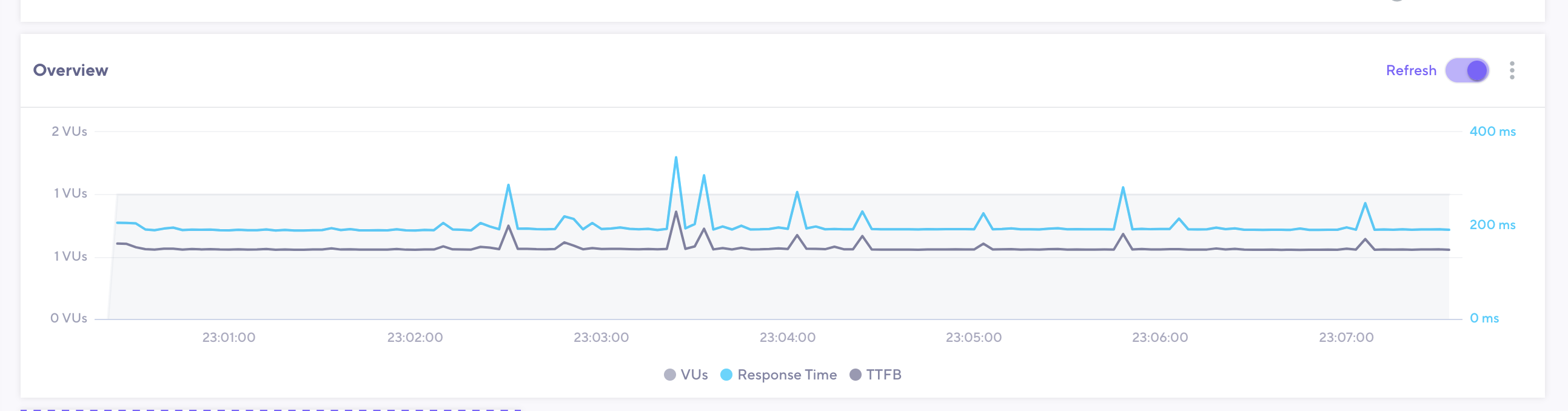 The image above contains a plot of both response time and TTFB for the following request body to our streaming PCM endpoint:
```bash theme={null}
curl -X POST http://users.rime.ai/v1/rime-tts \
-H 'Accept: audio/L16' \
-H 'Authorization: Bearer $RIME_API_KEY' \
-d '{"text": "I love the book that she gave me. And I was so happy that she gave it to me.", "speaker": "cove", "modelId": "mistv3"}'
```
To actually consume a streaming response in Python, iterate over the response body as it arrives instead of buffering the whole thing:
```python Python theme={null}
import requests
with requests.post(
"https://users.rime.ai/v1/rime-tts",
headers={
"Authorization": f"Bearer {RIME_API_KEY}",
"Content-Type": "application/json",
"Accept": "audio/mpeg",
},
json={
"speaker": "astra",
"text": "Hello from Coda.",
"modelId": "coda",
"language": "en",
},
stream=True,
) as response:
response.raise_for_status()
with open("hello.mp3", "wb") as f:
for chunk in response.iter_content(chunk_size=4096):
f.write(chunk)
```
### Recommendations for reducing response time
For the lowest cloud latency, use `mistv3` — typical TTFB is well below 100ms.
* Use the API parameter [`noTextNormalization`](/docs/text-normalization), which turns off text normalization, to reduce the amount of computation needed to prepare input text for TTS inference. This can safely be used in cases where there are no digits, abbreviations, or tricky punctuation, such as in `Yes, I grew up on one twenty-three Main Street in Oakland, California.` instead of `Yes, I grew up on 123 Main St. in Oakland, CA.`.
* Request audio that meets the needs of your application. Remember: Smaller payloads move across the network more quickly. For example, if you're building an application for telephony, request 8000kHz-sampled audio using the `samplingRate` parameter.
Rime's models produce PCM audio by default, and conversion and downsampling must take place for sampling rates other than 22kHz. Still, the reduction in payload size and therefore network overhead more than makes up for increased server processing time.
## Network latency by region
Rime serves the API from multiple regions so you can route requests to the data center closest to your application. Picking the closest endpoint typically shaves tens of milliseconds off round-trip time.
These are rough round-trip times (RTT) — the back-and-forth network delay between your application and Rime — from major US metros to each region:
| From metro | To US East | To US West |
| :---------------------------------------- | :--------- | :--------- |
| East Coast (NYC, DC, Boston, Atlanta) | 5–25 ms | 60–85 ms |
| Midwest / South (Chicago, Dallas, Denver) | 25–55 ms | 35–65 ms |
| West Coast (SF, LA, Seattle) | 60–85 ms | 5–25 ms |
Rules of thumb:
* **Same region** (your app and the Rime endpoint in the same AWS region): typically 1–10 ms.
* **Coast-to-coast**: \~60 ms is the physical floor, set by the speed of light in fiber across \~2,500 miles. 60–85 ms is normal.
* **Above 90 ms** between major US metros usually points to a suboptimal network route, not Rime.
**For voice AI:** if you serve users nationwide from a single region, far-coast users will see 60–85 ms of network round-trip on top of Rime's inference time. To stay comfortably under 200 ms end-to-end, route East-coast users to US East and West-coast users to US West.
For the full endpoint URLs and routing guidance, see [Regional endpoints](/docs/regional-endpoints). To measure TTFB against each endpoint from your own machine, run [`rime speedtest`](/cli-reference/rime-monitoring).
The image above contains a plot of both response time and TTFB for the following request body to our streaming PCM endpoint:
```bash theme={null}
curl -X POST http://users.rime.ai/v1/rime-tts \
-H 'Accept: audio/L16' \
-H 'Authorization: Bearer $RIME_API_KEY' \
-d '{"text": "I love the book that she gave me. And I was so happy that she gave it to me.", "speaker": "cove", "modelId": "mistv3"}'
```
To actually consume a streaming response in Python, iterate over the response body as it arrives instead of buffering the whole thing:
```python Python theme={null}
import requests
with requests.post(
"https://users.rime.ai/v1/rime-tts",
headers={
"Authorization": f"Bearer {RIME_API_KEY}",
"Content-Type": "application/json",
"Accept": "audio/mpeg",
},
json={
"speaker": "astra",
"text": "Hello from Coda.",
"modelId": "coda",
"language": "en",
},
stream=True,
) as response:
response.raise_for_status()
with open("hello.mp3", "wb") as f:
for chunk in response.iter_content(chunk_size=4096):
f.write(chunk)
```
### Recommendations for reducing response time
For the lowest cloud latency, use `mistv3` — typical TTFB is well below 100ms.
* Use the API parameter [`noTextNormalization`](/docs/text-normalization), which turns off text normalization, to reduce the amount of computation needed to prepare input text for TTS inference. This can safely be used in cases where there are no digits, abbreviations, or tricky punctuation, such as in `Yes, I grew up on one twenty-three Main Street in Oakland, California.` instead of `Yes, I grew up on 123 Main St. in Oakland, CA.`.
* Request audio that meets the needs of your application. Remember: Smaller payloads move across the network more quickly. For example, if you're building an application for telephony, request 8000kHz-sampled audio using the `samplingRate` parameter.
Rime's models produce PCM audio by default, and conversion and downsampling must take place for sampling rates other than 22kHz. Still, the reduction in payload size and therefore network overhead more than makes up for increased server processing time.
## Network latency by region
Rime serves the API from multiple regions so you can route requests to the data center closest to your application. Picking the closest endpoint typically shaves tens of milliseconds off round-trip time.
These are rough round-trip times (RTT) — the back-and-forth network delay between your application and Rime — from major US metros to each region:
| From metro | To US East | To US West |
| :---------------------------------------- | :--------- | :--------- |
| East Coast (NYC, DC, Boston, Atlanta) | 5–25 ms | 60–85 ms |
| Midwest / South (Chicago, Dallas, Denver) | 25–55 ms | 35–65 ms |
| West Coast (SF, LA, Seattle) | 60–85 ms | 5–25 ms |
Rules of thumb:
* **Same region** (your app and the Rime endpoint in the same AWS region): typically 1–10 ms.
* **Coast-to-coast**: \~60 ms is the physical floor, set by the speed of light in fiber across \~2,500 miles. 60–85 ms is normal.
* **Above 90 ms** between major US metros usually points to a suboptimal network route, not Rime.
**For voice AI:** if you serve users nationwide from a single region, far-coast users will see 60–85 ms of network round-trip on top of Rime's inference time. To stay comfortably under 200 ms end-to-end, route East-coast users to US East and West-coast users to US West.
For the full endpoint URLs and routing guidance, see [Regional endpoints](/docs/regional-endpoints). To measure TTFB against each endpoint from your own machine, run [`rime speedtest`](/cli-reference/rime-monitoring).